Hướng dẫn kết nối n8n với Microsoft 365 Calendar và Microsoft Teams để tự động nhắc lịch họp
 Nguyen Thai Trong
29/10/2026
6 phút đọc
Nguyen Thai Trong
29/10/2026
6 phút đọc
Workflow tự động gửi tin nhắn nhắc lịch họp vào nhóm chat Microsoft Teams khi cuộc họp trên Outlook Calendar còn 15 phút nữa bắt đầu.
📢 Lưu ý: Bài viết mang tính chất tham khảo. Quý Khách có thể tùy chỉnh hoặc bổ sung thêm các tính năng theo nhu cầu sử dụng.
1. Import workflow vào n8n
Sao chép đoạn JSON bên dưới → mở n8n → Create Workflow → nhấn Ctrl + V trên vùng làm việc (hoặc lưu thành file .json và chọn … → Import from File).
Quý Khách có thể tham khảo đoạn mã JSON dưới đây. Quý Khách có thể tùy chỉnh hoặc bổ sung thêm các tính năng theo nhu cầu sử dụng.
{
  "name": "M365 Calendar → Teams - Nhắc lịch họp",
  "nodes": [
    {
      "parameters": {
        "rule": {
          "interval": [
            {
              "field": "minutes"
            }
          ]
        }
      },
      "id": "31f06f77-58fe-4d8c-8a92-e1b7c1b1539b",
      "name": "Schedule Trigger",
      "type": "n8n-nodes-base.scheduleTrigger",
      "typeVersion": 1.2,
      "position": [
        0,
        0
      ]
    },
    {
      "parameters": {
        "resource": "event",
        "returnAll": true,
        "filters": {
          "custom": "=start/dateTime ge '{{ $now.toUTC().toFormat(\"yyyy-MM-dd'T'HH:mm:ss\") }}' and start/dateTime le '{{ $now.toUTC().plus({minutes: 20}).toFormat(\"yyyy-MM-dd'T'HH:mm:ss\") }}'"
        }
      },
      "id": "6e0d148e-f156-46f1-87ee-9e3d81992bee",
      "name": "Microsoft Outlook Calendar",
      "type": "n8n-nodes-base.microsoftOutlook",
      "typeVersion": 2,
      "position": [
        224,
        0
      ],
      "webhookId": "<YOUR_WEBHOOK_ID>",
      "credentials": {
        "microsoftOutlookOAuth2Api": {
          "id": "<YOUR_OUTLOOK_CREDENTIAL_ID>",
          "name": "Microsoft Outlook account"
        }
      }
    },
    {
      "parameters": {
        "jsCode": "// Nhắc các cuộc họp sắp bắt đầu trong vòng MAX phút\n// Ghi nhớ cuộc họp đã nhắc → mỗi cuộc họp chỉ nhắc 1 lần\nconst MAX = 15;\n\nconst now = DateTime.now().toUTC();\nconst memory = $getWorkflowStaticData('global');\nmemory.reminded = memory.reminded || {};\n\n// Xóa bộ nhớ cũ hơn 1 ngày\nfor (const [key, ts] of Object.entries(memory.reminded)) {\n  if (now.toMillis() - ts > 24 * 60 * 60 * 1000) delete memory.reminded[key];\n}\n\nconst results = [];\nfor (const item of $input.all()) {\n  const ev = item.json;\n  if (!ev.start || !ev.start.dateTime) continue;\n  if (ev.isCancelled) continue;\n\n  const raw = ev.start.dateTime.substring(0, 19); // bỏ phần .0000000\n  const start = DateTime.fromISO(raw, { zone: ev.start.timeZone || 'UTC' });\n  const minutesLeft = start.diff(now, 'minutes').minutes;\n\n  if (minutesLeft > 0 && minutesLeft <= MAX) {\n    const key = `${ev.id}|${raw}`;\n    if (memory.reminded[key]) continue;      // đã nhắc rồi → bỏ qua\n    memory.reminded[key] = now.toMillis();\n    results.push({ json: { ...ev, minutesLeft: Math.round(minutesLeft) } });\n  }\n}\n\nreturn results;"
      },
      "id": "920f12cf-45fb-451f-a0a1-3ba31a8541fa",
      "name": "Kiểm tra còn 15 phút",
      "type": "n8n-nodes-base.code",
      "typeVersion": 2,
      "position": [
        448,
        0
      ]
    },
    {
      "parameters": {
        "conditions": {
          "options": {
            "caseSensitive": true,
            "leftValue": "",
            "typeValidation": "strict",
            "version": 2
          },
          "conditions": [
            {
              "leftValue": "={{ $json.subject }}",
              "operator": {
                "type": "string",
                "operation": "notEmpty"
              },
              "id": "70eccd38-5313-467d-925a-80d015479bc9"
            }
          ],
          "combinator": "and"
        },
        "options": {}
      },
      "id": "44ceb2cc-1d7a-47c0-b39f-d57c658b4cee",
      "name": "Có cuộc họp cần nhắc?",
      "type": "n8n-nodes-base.if",
      "typeVersion": 2.2,
      "position": [
        672,
        0
      ]
    },
    {
      "parameters": {
        "resource": "chatMessage",
        "chatId": {
          "__rl": true,
          "value": "<YOUR_TEAMS_CHAT_ID>",
          "mode": "list",
          "cachedResultName": "<TEN_NHOM_CHAT>",
          "cachedResultUrl": "<TEAMS_CHAT_URL>"
        },
        "contentType": "html",
        "message": "=⏰ ⏰ <b>Nhắc lịch họp - còn {{ $json.minutesLeft }} phút!</b><br>\n📌 <b>Chủ đề:</b> {{ $json.subject }}<br>\n🕒 <b>Bắt đầu:</b> {{ DateTime.fromISO($json.start.dateTime, {zone: 'utc'}).setZone('Asia/Ho_Chi_Minh').toFormat('HH:mm - dd/MM/yyyy') }}<br>\n📍 <b>Địa điểm:</b> {{ $json.location?.displayName || 'Online' }}",
        "options": {}
      },
      "id": "7bd1bde1-9674-4f70-bf69-509e339dc648",
      "name": "Microsoft Teams - Gửi nhắc",
      "type": "n8n-nodes-base.microsoftTeams",
      "typeVersion": 2,
      "position": [
        928,
        -128
      ],
      "webhookId": "<YOUR_WEBHOOK_ID>",
      "credentials": {
        "microsoftTeamsOAuth2Api": {
          "id": "<YOUR_TEAMS_CREDENTIAL_ID>",
          "name": "Microsoft Teams account"
        }
      }
    }
  ],
  "pinData": {},
  "connections": {
    "Schedule Trigger": {
      "main": [
        [
          {
            "node": "Microsoft Outlook Calendar",
            "type": "main",
            "index": 0
          }
        ]
      ]
    },
    "Microsoft Outlook Calendar": {
      "main": [
        [
          {
            "node": "Kiểm tra còn 15 phút",
            "type": "main",
            "index": 0
          }
        ]
      ]
    },
    "Kiểm tra còn 15 phút": {
      "main": [
        [
          {
            "node": "Có cuộc họp cần nhắc?",
            "type": "main",
            "index": 0
          }
        ]
      ]
    },
    "Có cuộc họp cần nhắc?": {
      "main": [
        [
          {
            "node": "Microsoft Teams - Gửi nhắc",
            "type": "main",
            "index": 0
          }
        ]
      ]
    }
  },
  "active": true,
  "settings": {
    "executionOrder": "v1",
    "binaryMode": "separate",
    "availableInMCP": false,
    "timeSavedMode": "fixed",
    "timezone": "Asia/Ho_Chi_Minh",
    "callerPolicy": "workflowsFromSameOwner"
  },
  "versionId": "<YOUR_VERSION_ID>",
  "meta": {
    "templateCredsSetupCompleted": true,
    "instanceId": "<YOUR_INSTANCE_ID>"
  },
  "nodeGroups": [],
  "id": "<YOUR_WORKFLOW_ID>",
  "tags": []
}
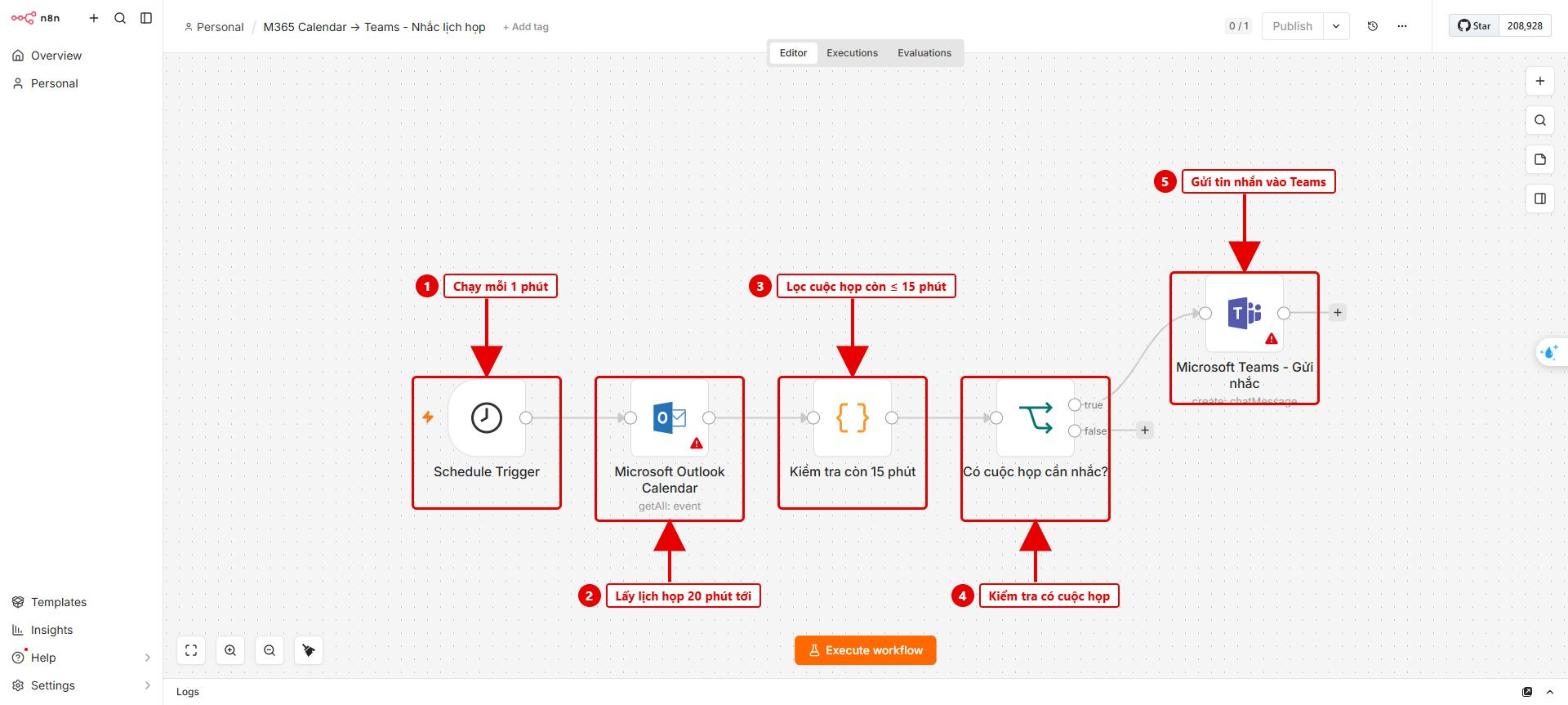 Hình 1: Tổng quan 5 node của workflow trong n8n
2. Tạo App Registration trên Azure
- App registrations → New registration: đặt tên, chọn Single tenant, Redirect URI chọn Web và dán OAuth Redirect URL lấy từ n8n → Register. Sao chép Client ID.
- Certificates & secrets → New client secret: sao chép ngay Value.
- API permissions → Microsoft Graph → Delegated: thêm
offline_access, User.Read, Calendars.Read, Chat.ReadWrite → Grant admin consent.
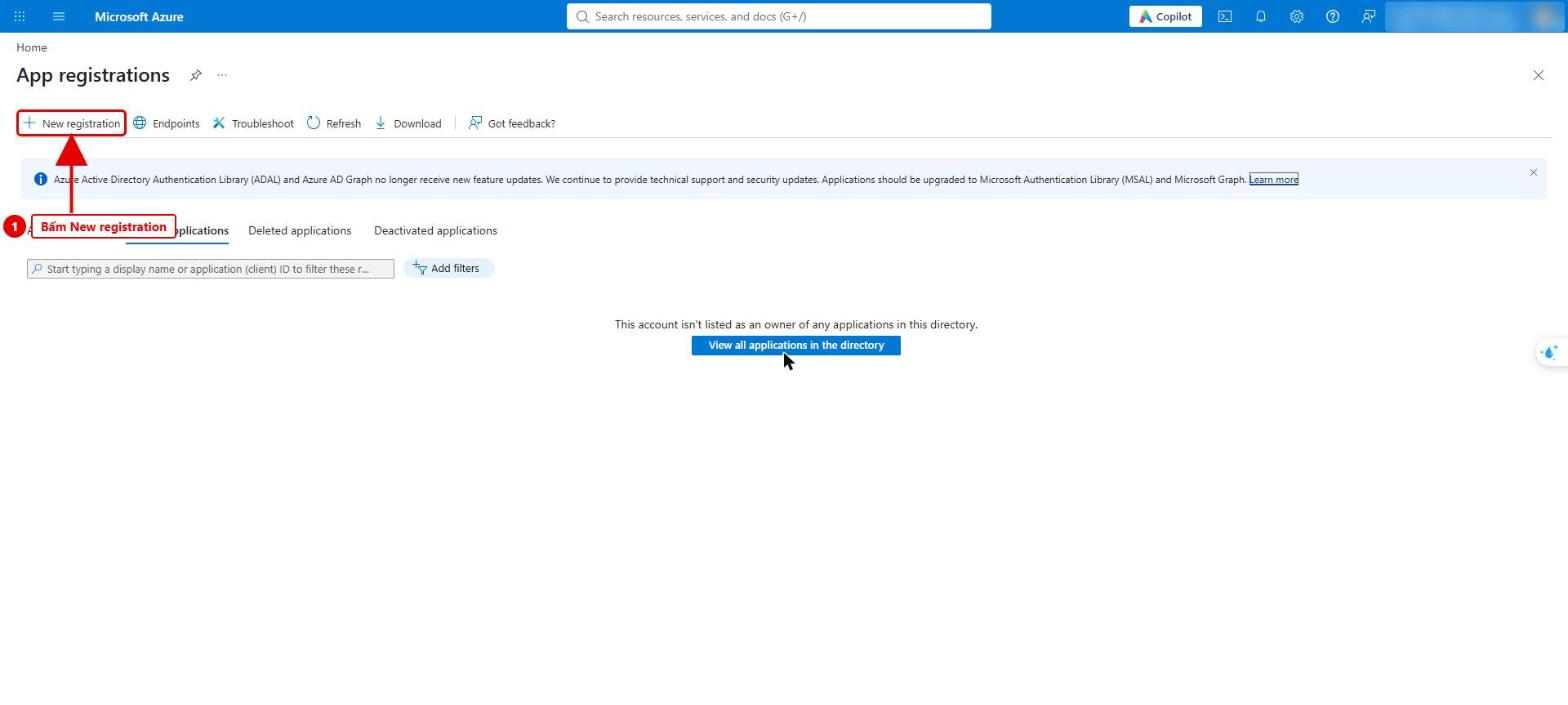 Hình 2: Vào App registrations và bấm New registration
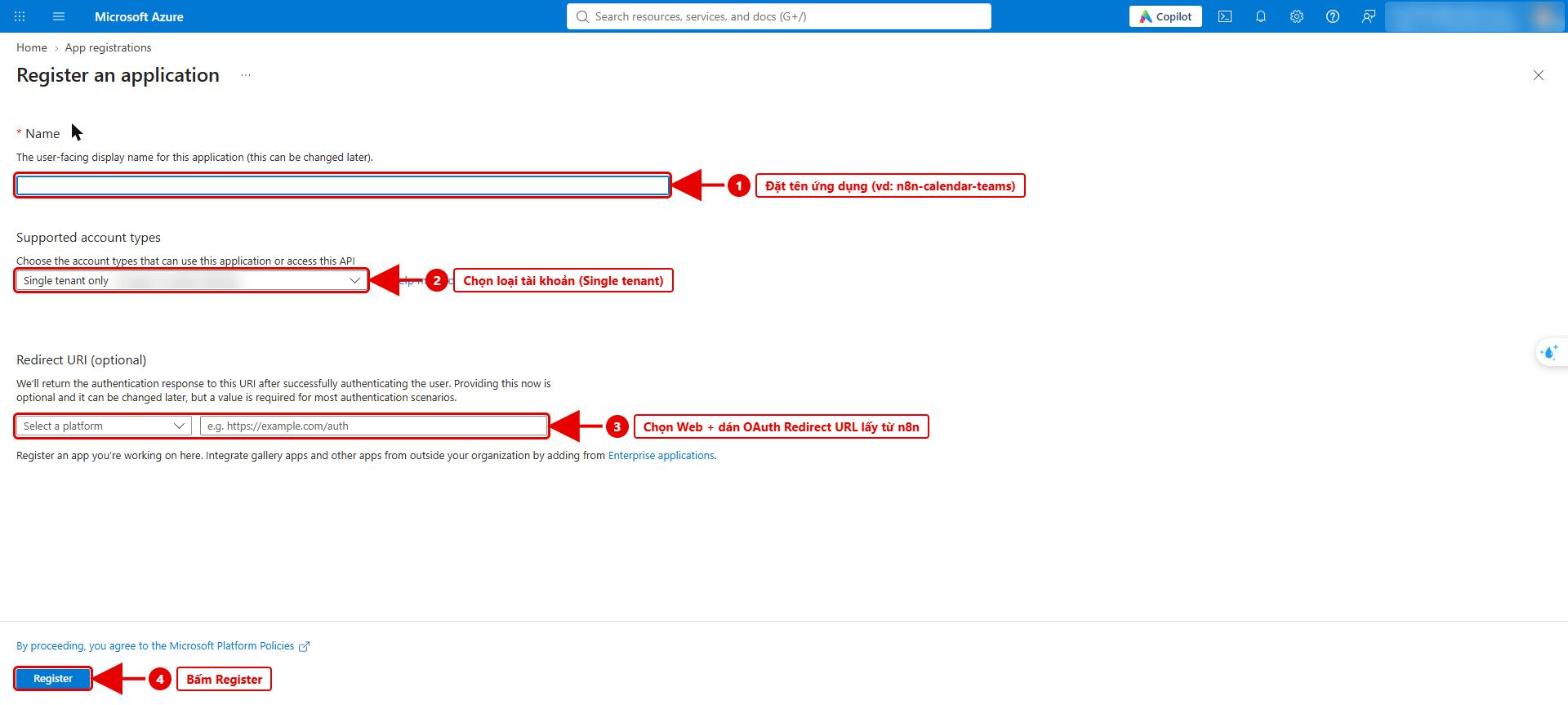 Hình 3: Điền thông tin đăng ký ứng dụng và Redirect URI
3. Kết nối Outlook Calendar
Mở node Microsoft Outlook Calendar → Set up credential → dán Client ID, Client Secret → Save → Connect my account → đăng nhập Microsoft 365.
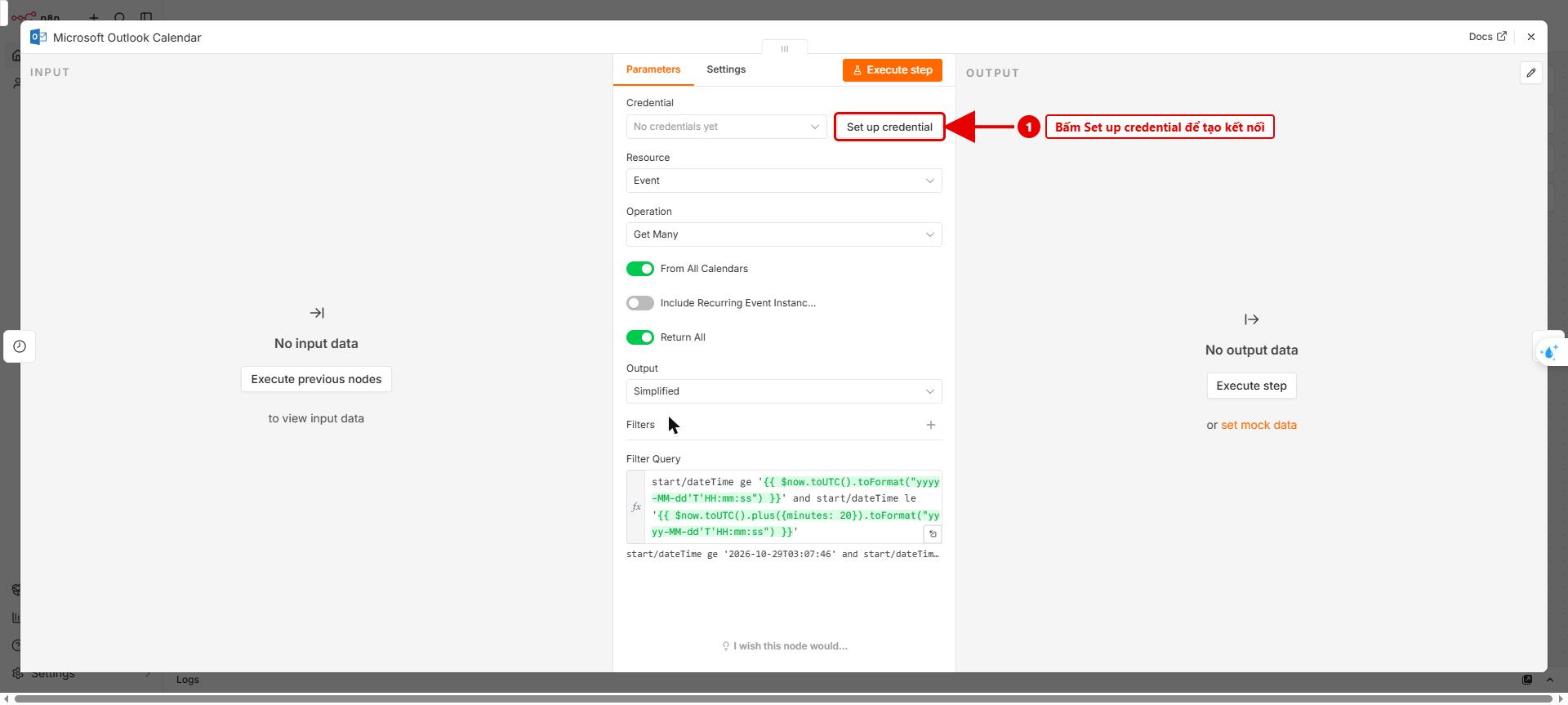 Hình 4: Node Microsoft Outlook Calendar – bấm Set up credential
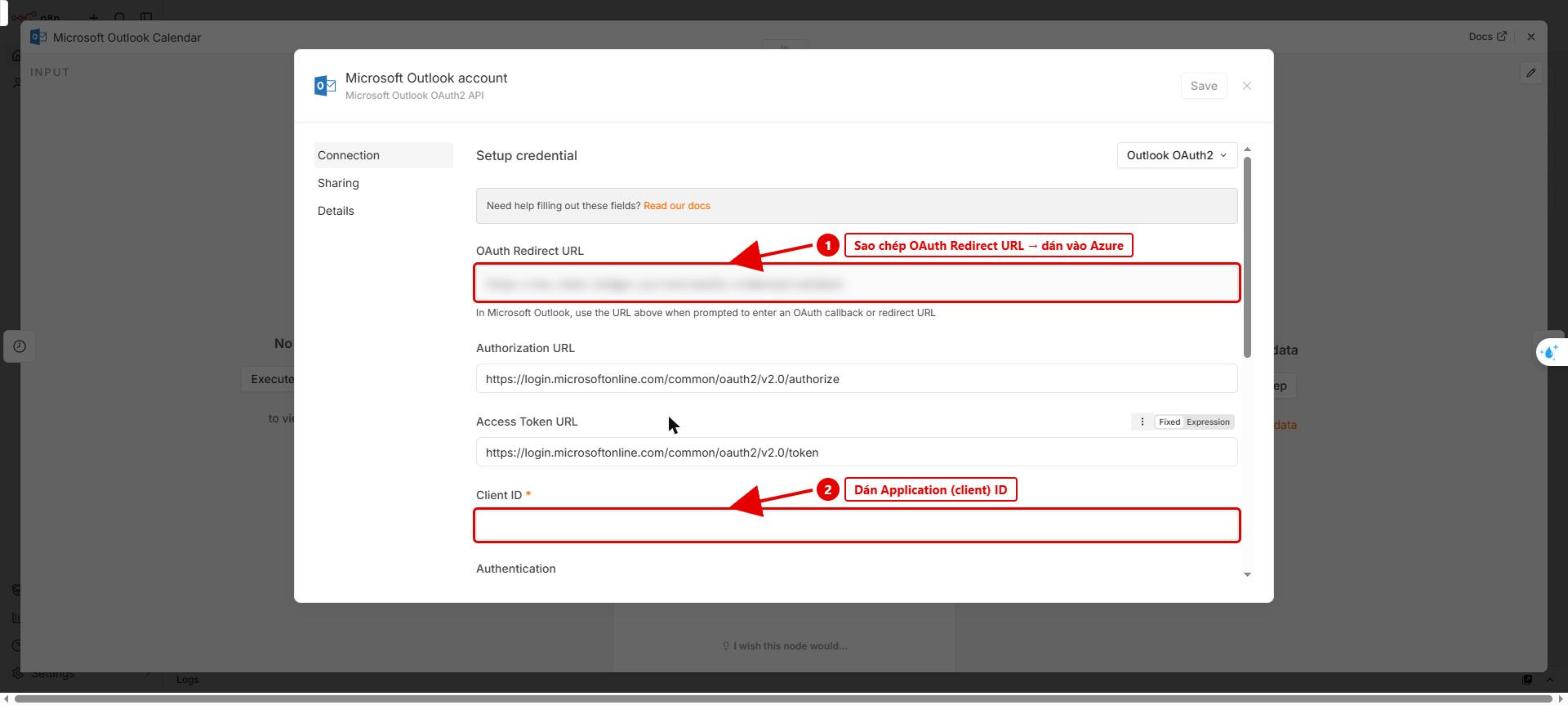 Hình 5: Sao chép OAuth Redirect URL và dán Client ID
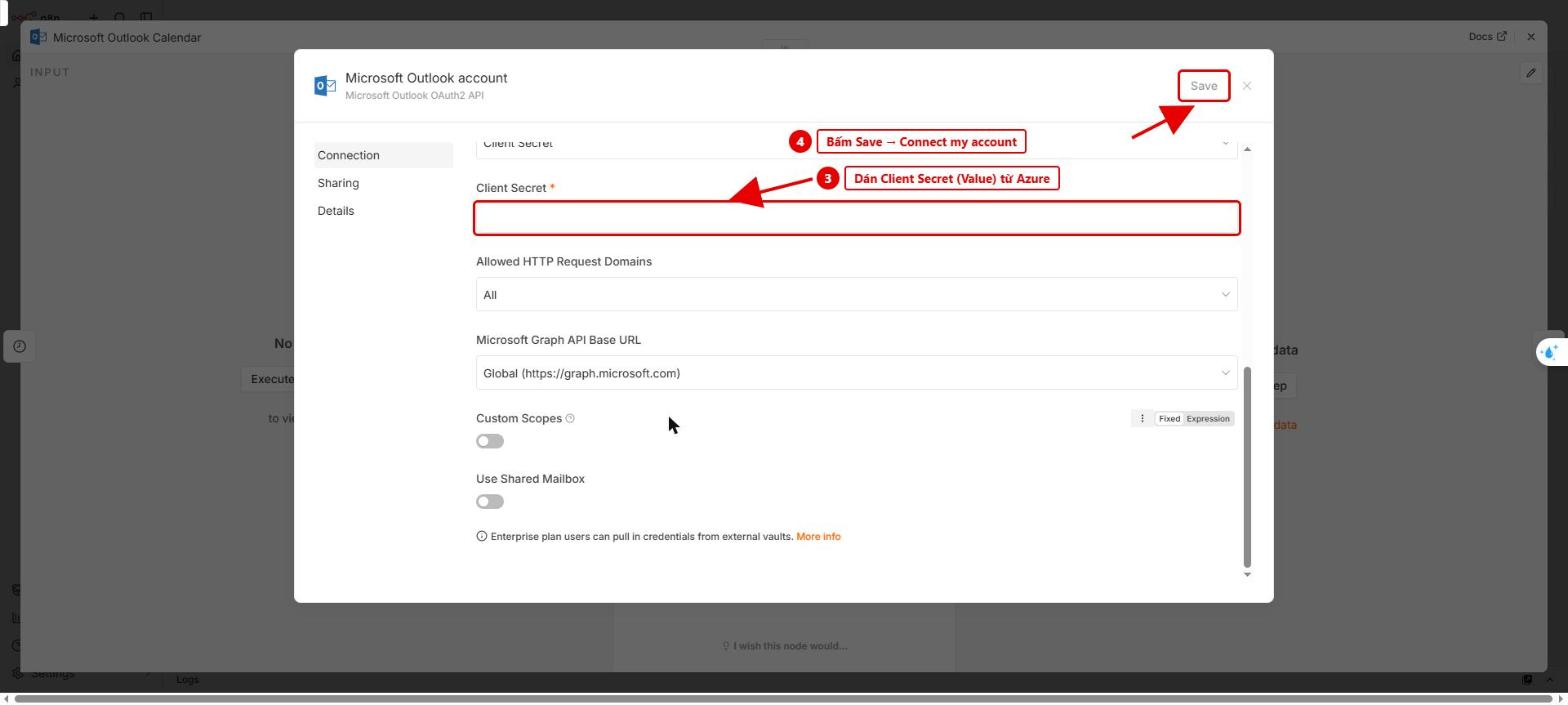 Hình 6: Dán Client Secret, bấm Save rồi Connect my account
4. Kết nối Microsoft Teams
Mở node Microsoft Teams – Gửi nhắc → tạo credential tương tự bước 3 → tại Chat chọn nhóm chat nhận thông báo.
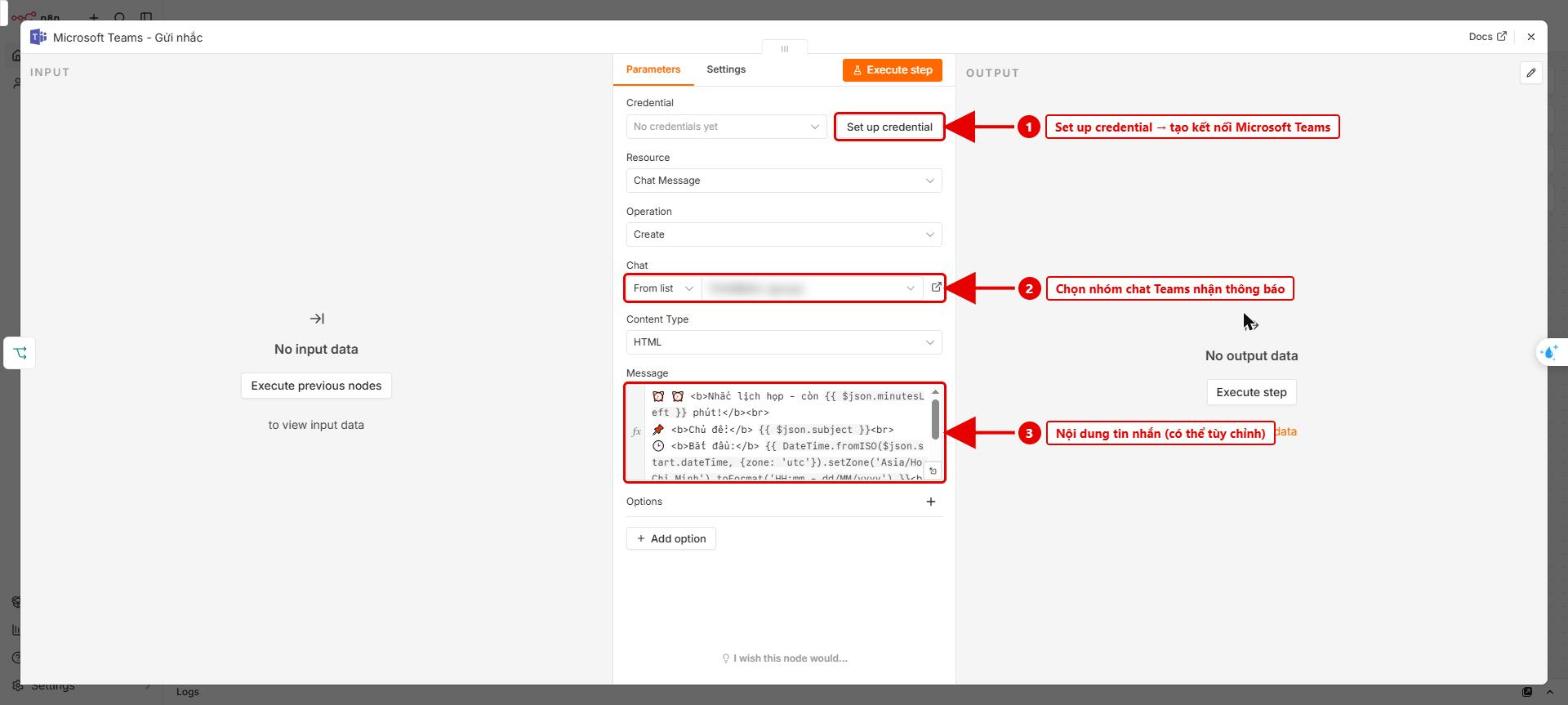 Hình 7: Node Microsoft Teams – tạo credential, chọn nhóm chat, kiểm tra nội dung tin nhắn
5. Chạy thử và kích hoạt
Tạo một cuộc họp thử bắt đầu sau khoảng 10 phút → bấm Execute workflow để kiểm tra tin nhắn trên Teams → bấm Publish để workflow tự chạy mỗi phút.
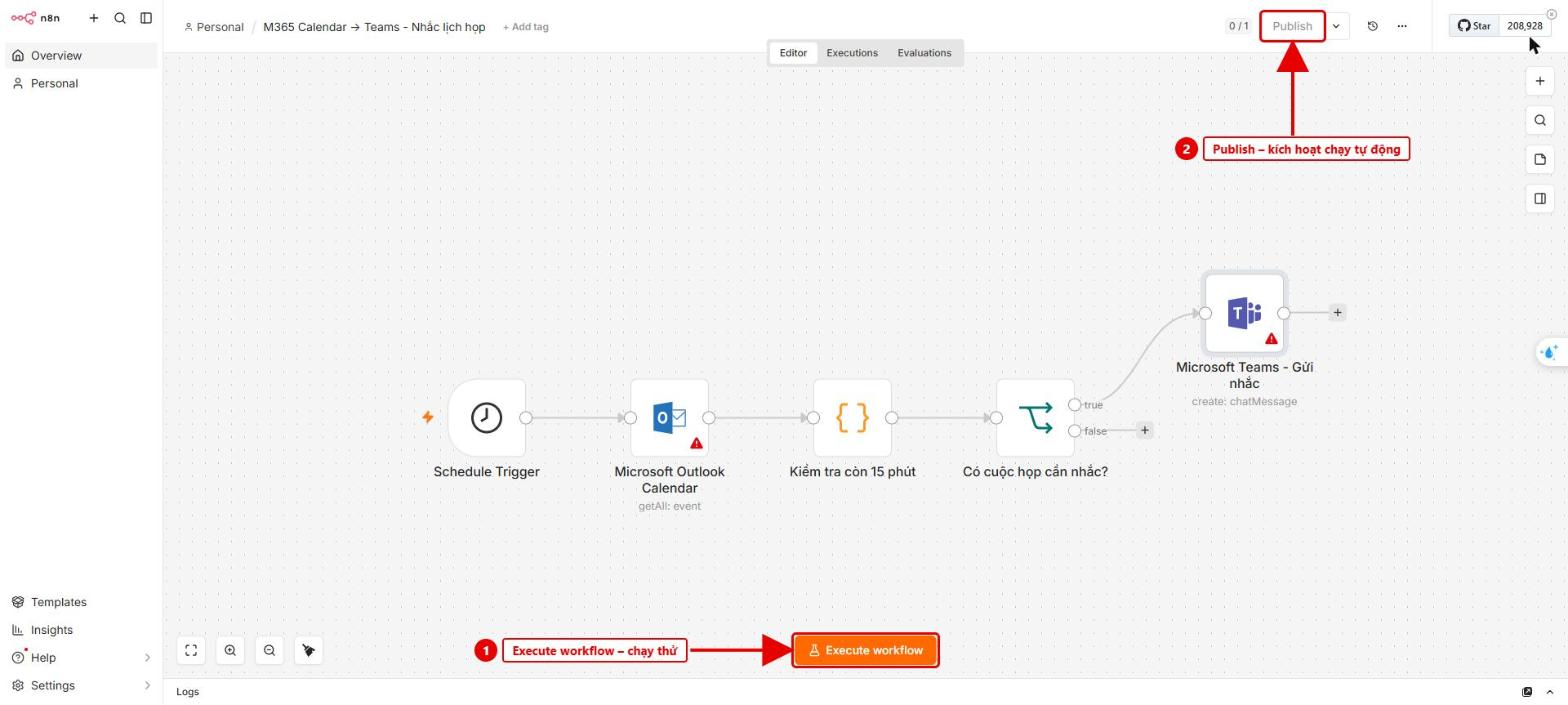 Hình 8: Execute workflow để chạy thử, Publish để kích hoạt
Mẹo: muốn nhắc sớm hơn, sửa const MAX = 15; trong node “Kiểm tra còn 15 phút”.