Hướng dẫn tự động hóa quy trình xin nghỉ phép trên Microsoft 365 với n8n
 Nguyen Thai Trong
29/10/2026
10 phút đọc
Nguyen Thai Trong
29/10/2026
10 phút đọc
Nhân viên điền form xin nghỉ phép → quản lý nhận email có nút Duyệt / Từ chối (Outlook) → nhân viên được báo kết quả, ngày nghỉ được tạo trên Outlook Calendar và ghi log vào Excel 365.
📢 Lưu ý: Bài viết mang tính chất tham khảo. Quý Khách có thể tùy chỉnh hoặc bổ sung thêm các tính năng theo nhu cầu sử dụng.
1. Import workflow vào n8n
Sao chép đoạn JSON bên dưới → mở n8n → Create Workflow → nhấn Ctrl + V trên vùng làm việc (hoặc lưu thành file .json và chọn … → Import from File).
Quý Khách có thể tham khảo đoạn mã JSON dưới đây. Quý Khách có thể tùy chỉnh hoặc bổ sung thêm các tính năng theo nhu cầu sử dụng.
{
  "name": "Xin nghỉ phép tự động - MS365",
  "nodes": [
    {
      "parameters": {
        "formTitle": "Đơn xin nghỉ phép",
        "formDescription": "Vui lòng điền đầy đủ thông tin. Đơn sẽ được gửi tới quản lý trực tiếp để duyệt.",
        "formFields": {
          "values": [
            {
              "fieldLabel": "Họ và tên",
              "requiredField": true
            },
            {
              "fieldLabel": "Email nhân viên",
              "fieldType": "email",
              "requiredField": true
            },
            {
              "fieldLabel": "Email quản lý",
              "fieldType": "email",
              "requiredField": true
            },
            {
              "fieldLabel": "Loại nghỉ",
              "fieldType": "dropdown",
              "fieldOptions": {
                "values": [
                  {
                    "option": "Nghỉ phép năm"
                  },
                  {
                    "option": "Nghỉ ốm"
                  },
                  {
                    "option": "Nghỉ không lương"
                  },
                  {
                    "option": "Nghỉ việc riêng"
                  }
                ]
              },
              "requiredField": true
            },
            {
              "fieldLabel": "Từ ngày",
              "fieldType": "date",
              "requiredField": true
            },
            {
              "fieldLabel": "Đến ngày",
              "fieldType": "date",
              "requiredField": true
            },
            {
              "fieldLabel": "Lý do",
              "fieldType": "textarea",
              "requiredField": true
            }
          ]
        },
        "responseMode": "onReceived",
        "options": {
          "respondWithOptions": {
            "values": {
              "formSubmittedText": "Đơn của bạn đã được gửi. Bạn sẽ nhận email khi quản lý phản hồi."
            }
          }
        }
      },
      "id": "a1000000-0000-4000-8000-000000000001",
      "name": "Form xin nghỉ phép",
      "type": "n8n-nodes-base.formTrigger",
      "typeVersion": 2.2,
      "position": [
        0,
        300
      ],
      "webhookId": "a1000000-0000-4000-8000-0000000000aa"
    },
    {
      "parameters": {
        "jsCode": "const f = $input.first().json;\nconst from = new Date(f['Từ ngày']);\nconst to = new Date(f['Đến ngày']);\n\nif (to < from) {\n  throw new Error('Ngày kết thúc phải sau hoặc bằng ngày bắt đầu');\n}\n\n// Đếm số ngày làm việc (bỏ Thứ 7, Chủ nhật)\nlet days = 0;\nfor (let d = new Date(from); d <= to; d.setDate(d.getDate() + 1)) {\n  const wd = d.getDay();\n  if (wd !== 0 && wd !== 6) days++;\n}\n\nconst fmt = (d) => d.toLocaleDateString('vi-VN');\nconst endPlusOne = new Date(to);\nendPlusOne.setDate(endPlusOne.getDate() + 1);\n\nreturn [{\n  json: {\n    requestId: 'NP-' + Date.now(),\n    hoTen: f['Họ và tên'],\n    emailNV: f['Email nhân viên'],\n    emailQL: f['Email quản lý'],\n    loaiNghi: f['Loại nghỉ'],\n    tuNgay: f['Từ ngày'],\n    denNgay: f['Đến ngày'],\n    tuNgayVN: fmt(from),\n    denNgayVN: fmt(to),\n    eventEnd: endPlusOne.toISOString().slice(0, 10),\n    soNgay: days,\n    lyDo: f['Lý do'],\n    ngayGui: new Date().toISOString()\n  }\n}];"
      },
      "id": "a1000000-0000-4000-8000-000000000002",
      "name": "Xử lý dữ liệu",
      "type": "n8n-nodes-base.code",
      "typeVersion": 2,
      "position": [
        220,
        300
      ]
    },
    {
      "parameters": {
        "operation": "sendAndWait",
        "sendTo": "={{ $json.emailQL }}",
        "subject": "=[Duyệt nghỉ phép] {{ $json.hoTen }} - {{ $json.soNgay }} ngày ({{ $json.requestId }})",
        "message": "=Nhân viên: {{ $json.hoTen }} ({{ $json.emailNV }})\nLoại nghỉ: {{ $json.loaiNghi }}\nThời gian: {{ $json.tuNgayVN }} → {{ $json.denNgayVN }} ({{ $json.soNgay }} ngày làm việc)\nLý do: {{ $json.lyDo }}\n\nVui lòng bấm nút bên dưới để Duyệt hoặc Từ chối.",
        "responseType": "approval",
        "approvalOptions": {
          "values": {
            "approvalType": "double",
            "approveLabel": "Duyệt",
            "disapproveLabel": "Từ chối"
          }
        },
        "options": {
          "limitWaitTime": {
            "values": {
              "limitType": "afterTimeInterval",
              "resumeAmount": 3,
              "resumeUnit": "days"
            }
          }
        }
      },
      "id": "a1000000-0000-4000-8000-000000000003",
      "name": "Gửi quản lý duyệt",
      "type": "n8n-nodes-base.microsoftOutlook",
      "typeVersion": 2,
      "position": [
        440,
        300
      ],
      "webhookId": "a1000000-0000-4000-8000-0000000000bb",
      "credentials": {
        "microsoftOutlookOAuth2Api": {
          "id": "",
          "name": "Microsoft Outlook account"
        }
      }
    },
    {
      "parameters": {
        "conditions": {
          "options": {
            "caseSensitive": true,
            "leftValue": "",
            "typeValidation": "loose"
          },
          "conditions": [
            {
              "id": "c1",
              "leftValue": "={{ $json.data.approved }}",
              "rightValue": true,
              "operator": {
                "type": "boolean",
                "operation": "true",
                "singleValue": true
              }
            }
          ],
          "combinator": "and"
        },
        "options": {}
      },
      "id": "a1000000-0000-4000-8000-000000000004",
      "name": "Được duyệt?",
      "type": "n8n-nodes-base.if",
      "typeVersion": 2.2,
      "position": [
        660,
        300
      ]
    },
    {
      "parameters": {
        "toRecipients": "={{ $('Xử lý dữ liệu').item.json.emailNV }}",
        "subject": "=✅ Đơn nghỉ phép {{ $('Xử lý dữ liệu').item.json.requestId }} đã được DUYỆT",
        "bodyContent": "=Chào {{ $('Xử lý dữ liệu').item.json.hoTen }},<br><br>Đơn nghỉ <b>{{ $('Xử lý dữ liệu').item.json.loaiNghi }}</b> từ <b>{{ $('Xử lý dữ liệu').item.json.tuNgayVN }}</b> đến <b>{{ $('Xử lý dữ liệu').item.json.denNgayVN }}</b> ({{ $('Xử lý dữ liệu').item.json.soNgay }} ngày) đã được quản lý duyệt.<br><br>Trân trọng.",
        "additionalFields": {
          "bodyContentType": "html"
        }
      },
      "id": "a1000000-0000-4000-8000-000000000005",
      "name": "Báo NV - Đã duyệt",
      "type": "n8n-nodes-base.microsoftOutlook",
      "typeVersion": 2,
      "position": [
        900,
        180
      ],
      "credentials": {
        "microsoftOutlookOAuth2Api": {
          "id": "",
          "name": "Microsoft Outlook account"
        }
      }
    },
    {
      "parameters": {
        "resource": "event",
        "operation": "create",
        "calendarId": {
          "__rl": true,
          "value": "",
          "mode": "list"
        },
        "subject": "=🏖 {{ $('Xử lý dữ liệu').item.json.hoTen }} nghỉ phép ({{ $('Xử lý dữ liệu').item.json.loaiNghi }})",
        "startDateTime": "={{ $('Xử lý dữ liệu').item.json.tuNgay }}T00:00:00",
        "endDateTime": "={{ $('Xử lý dữ liệu').item.json.eventEnd }}T00:00:00",
        "additionalFields": {
          "isAllDay": true,
          "showAs": "oof"
        }
      },
      "id": "a1000000-0000-4000-8000-000000000006",
      "name": "Tạo lịch nghỉ (Outlook Calendar)",
      "type": "n8n-nodes-base.microsoftOutlook",
      "typeVersion": 2,
      "position": [
        1120,
        180
      ],
      "credentials": {
        "microsoftOutlookOAuth2Api": {
          "id": "",
          "name": "Microsoft Outlook account"
        }
      }
    },
    {
      "parameters": {
        "toRecipients": "={{ $('Xử lý dữ liệu').item.json.emailNV }}",
        "subject": "=❌ Đơn nghỉ phép {{ $('Xử lý dữ liệu').item.json.requestId }} bị TỪ CHỐI",
        "bodyContent": "=Chào {{ $('Xử lý dữ liệu').item.json.hoTen }},<br><br>Đơn nghỉ từ <b>{{ $('Xử lý dữ liệu').item.json.tuNgayVN }}</b> đến <b>{{ $('Xử lý dữ liệu').item.json.denNgayVN }}</b> chưa được duyệt (bị từ chối hoặc quá hạn phản hồi). Vui lòng trao đổi trực tiếp với quản lý.<br><br>Trân trọng.",
        "additionalFields": {
          "bodyContentType": "html"
        }
      },
      "id": "a1000000-0000-4000-8000-000000000007",
      "name": "Báo NV - Từ chối",
      "type": "n8n-nodes-base.microsoftOutlook",
      "typeVersion": 2,
      "position": [
        900,
        420
      ],
      "credentials": {
        "microsoftOutlookOAuth2Api": {
          "id": "",
          "name": "Microsoft Outlook account"
        }
      }
    },
    {
      "parameters": {
        "resource": "worksheet",
        "operation": "append",
        "workbook": {
          "__rl": true,
          "value": "",
          "mode": "list"
        },
        "worksheet": {
          "__rl": true,
          "value": "",
          "mode": "list"
        },
        "columns": {
          "mappingMode": "defineBelow",
          "value": {
            "Mã đơn": "={{ $('Xử lý dữ liệu').item.json.requestId }}",
            "Họ tên": "={{ $('Xử lý dữ liệu').item.json.hoTen }}",
            "Email": "={{ $('Xử lý dữ liệu').item.json.emailNV }}",
            "Quản lý": "={{ $('Xử lý dữ liệu').item.json.emailQL }}",
            "Loại nghỉ": "={{ $('Xử lý dữ liệu').item.json.loaiNghi }}",
            "Từ ngày": "={{ $('Xử lý dữ liệu').item.json.tuNgay }}",
            "Đến ngày": "={{ $('Xử lý dữ liệu').item.json.denNgay }}",
            "Số ngày": "={{ $('Xử lý dữ liệu').item.json.soNgay }}",
            "Lý do": "={{ $('Xử lý dữ liệu').item.json.lyDo }}",
            "Trạng thái": "={{ $('Gửi quản lý duyệt').item.json.data.approved ? 'Đã duyệt' : 'Từ chối' }}",
            "Ngày gửi": "={{ $('Xử lý dữ liệu').item.json.ngayGui }}"
          }
        },
        "options": {}
      },
      "id": "a1000000-0000-4000-8000-000000000008",
      "name": "Ghi log Excel 365",
      "type": "n8n-nodes-base.microsoftExcel",
      "typeVersion": 2.1,
      "position": [
        1340,
        300
      ],
      "credentials": {
        "microsoftExcelOAuth2Api": {
          "id": "",
          "name": "Microsoft Excel account"
        }
      }
    }
  ],
  "connections": {
    "Form xin nghỉ phép": {
      "main": [
        [
          {
            "node": "Xử lý dữ liệu",
            "type": "main",
            "index": 0
          }
        ]
      ]
    },
    "Xử lý dữ liệu": {
      "main": [
        [
          {
            "node": "Gửi quản lý duyệt",
            "type": "main",
            "index": 0
          }
        ]
      ]
    },
    "Gửi quản lý duyệt": {
      "main": [
        [
          {
            "node": "Được duyệt?",
            "type": "main",
            "index": 0
          }
        ]
      ]
    },
    "Được duyệt?": {
      "main": [
        [
          {
            "node": "Báo NV - Đã duyệt",
            "type": "main",
            "index": 0
          }
        ],
        [
          {
            "node": "Báo NV - Từ chối",
            "type": "main",
            "index": 0
          }
        ]
      ]
    },
    "Báo NV - Đã duyệt": {
      "main": [
        [
          {
            "node": "Tạo lịch nghỉ (Outlook Calendar)",
            "type": "main",
            "index": 0
          }
        ]
      ]
    },
    "Tạo lịch nghỉ (Outlook Calendar)": {
      "main": [
        [
          {
            "node": "Ghi log Excel 365",
            "type": "main",
            "index": 0
          }
        ]
      ]
    },
    "Báo NV - Từ chối": {
      "main": [
        [
          {
            "node": "Ghi log Excel 365",
            "type": "main",
            "index": 0
          }
        ]
      ]
    }
  },
  "settings": {
    "executionOrder": "v1"
  },
  "pinData": {}
}
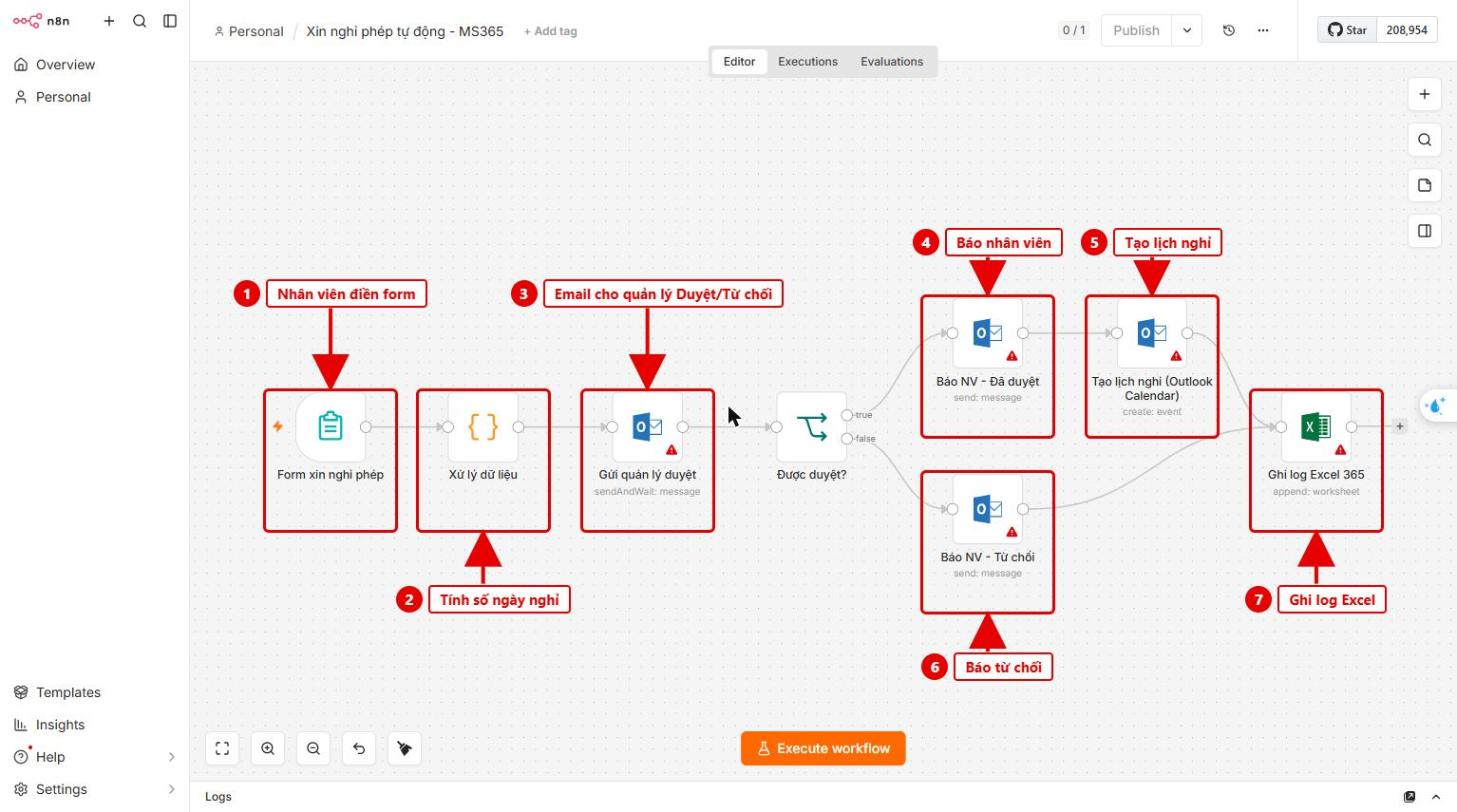
Hình 1: Luồng xử lý đơn xin nghỉ phép
2. Tạo App Registration trên Azure
Thực hiện như bài nhắc lịch họp (tạo app, Redirect URI, Client Secret). Ở mục API permissions → Microsoft Graph → Delegated, thêm: offline_access, User.Read, Mail.Send, Calendars.ReadWrite, Files.ReadWrite → Grant admin consent.
3. Kết nối Outlook – gửi quản lý duyệt
- Mở node Gửi quản lý duyệt → Set up credential → dán Client ID, Client Secret → Save → Connect my account.
- Nếu ô To đang trống, chuyển sang Expression và nhập
{{ $json.emailQL }}.
- Các node Báo NV – Đã duyệt, Báo NV – Từ chối: chỉ cần chọn lại credential Outlook vừa tạo.
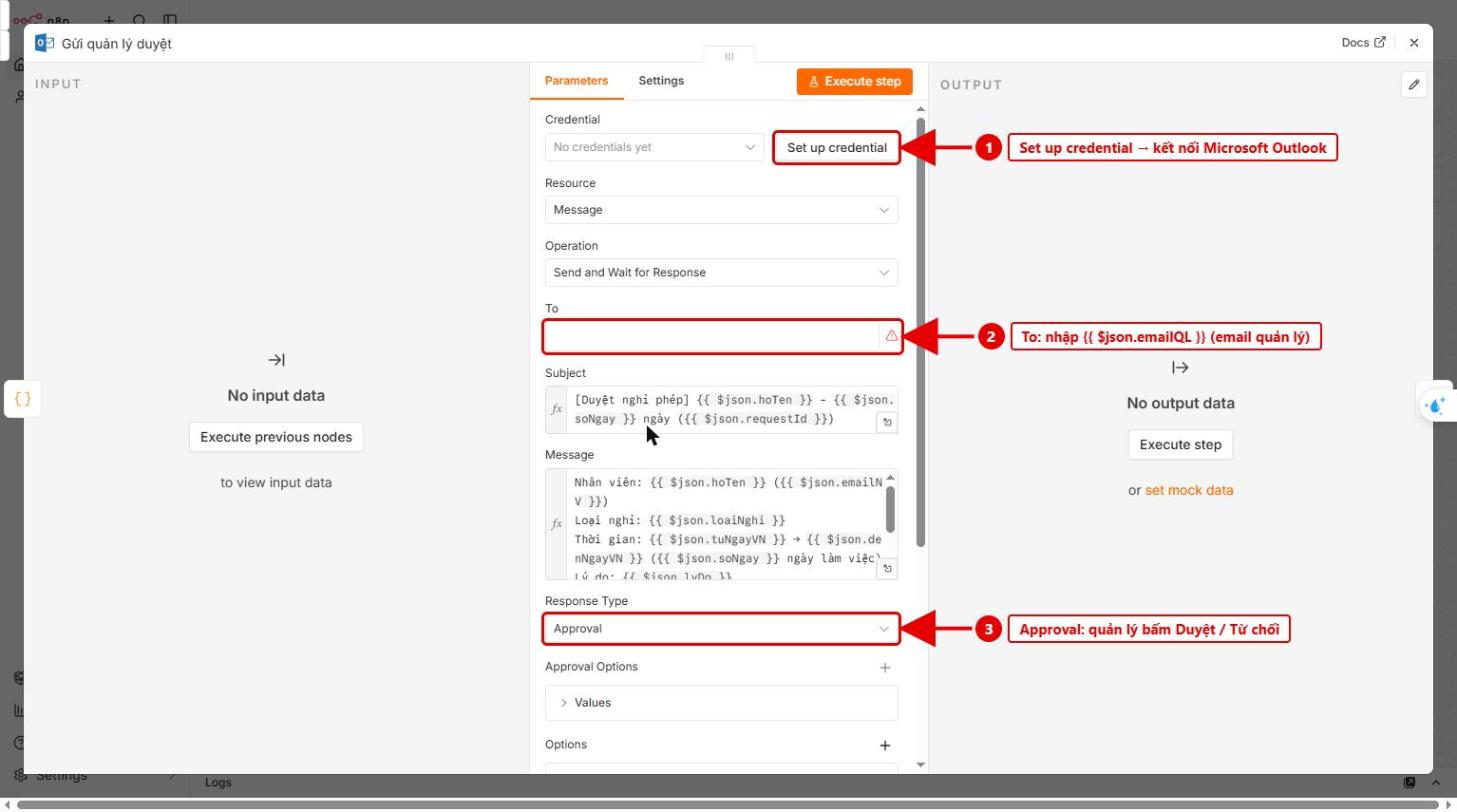
Hình 2: Node Gửi quản lý duyệt
4. Chọn lịch Outlook Calendar
Mở node Tạo lịch nghỉ (Outlook Calendar) → chọn credential Outlook → tại Calendar chọn lịch sẽ ghi ngày nghỉ (nên dùng lịch chung của phòng/nhóm).
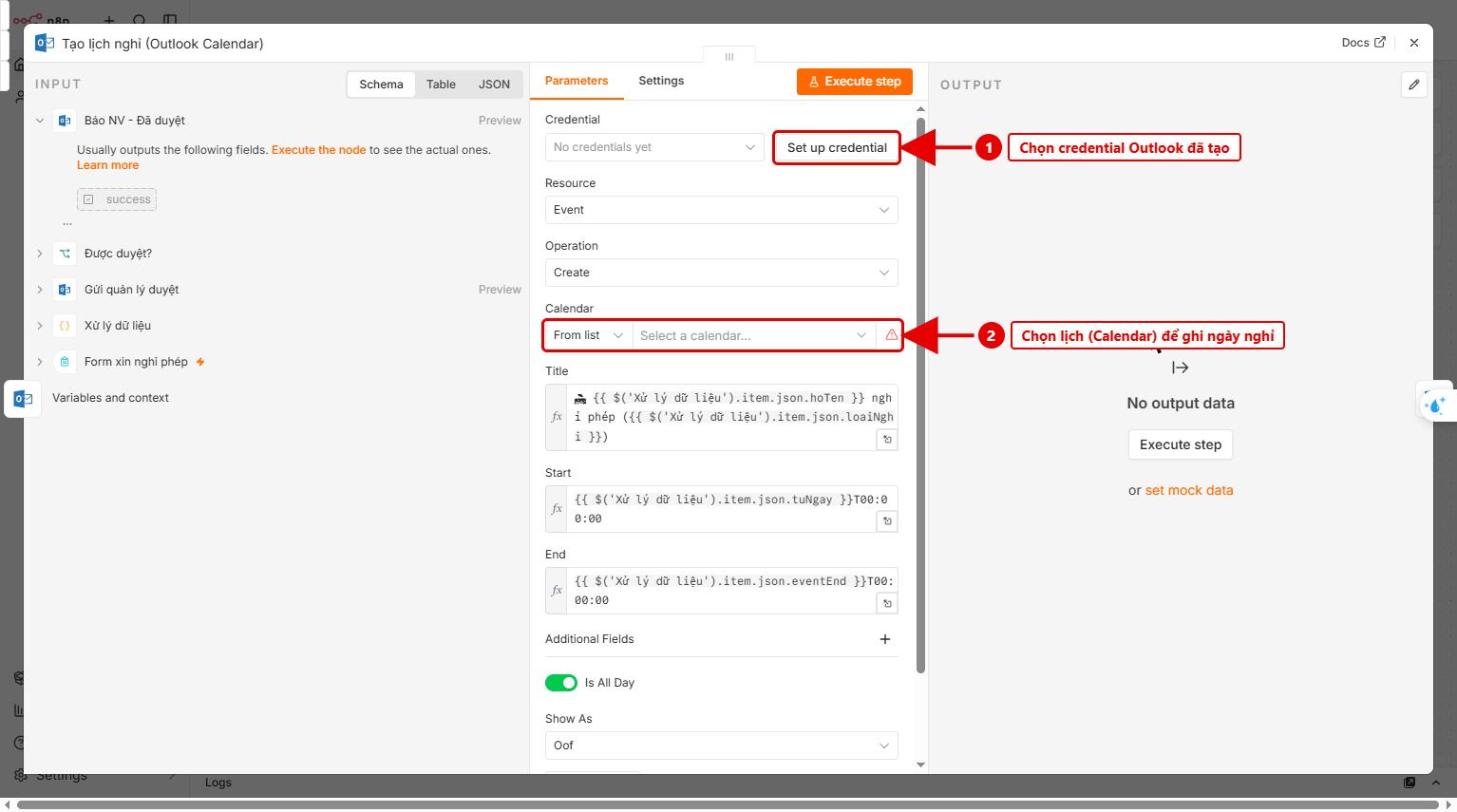
Hình 3: Chọn lịch để tạo sự kiện nghỉ phép
5. Kết nối Excel 365 ghi log
- Tạo file Excel trên OneDrive, dòng đầu có các cột: Mã đơn, Họ tên, Email, Quản lý, Loại nghỉ, Từ ngày, Đến ngày, Số ngày, Lý do, Trạng thái, Ngày gửi.
- Mở node Ghi log Excel 365 → Set up credential (Microsoft Excel) → chọn Workbook và Sheet.
- Nếu phần Values to Send đang trống, map các cột theo bảng sau:
| Cột Excel |
Giá trị (Expression) |
| Mã đơn |
{{ $('Xử lý dữ liệu').item.json.requestId }} |
| Họ tên |
{{ $('Xử lý dữ liệu').item.json.hoTen }} |
| Email |
{{ $('Xử lý dữ liệu').item.json.emailNV }} |
| Quản lý |
{{ $('Xử lý dữ liệu').item.json.emailQL }} |
| Loại nghỉ |
{{ $('Xử lý dữ liệu').item.json.loaiNghi }} |
| Từ ngày |
{{ $('Xử lý dữ liệu').item.json.tuNgay }} |
| Đến ngày |
{{ $('Xử lý dữ liệu').item.json.denNgay }} |
| Số ngày |
{{ $('Xử lý dữ liệu').item.json.soNgay }} |
| Lý do |
{{ $('Xử lý dữ liệu').item.json.lyDo }} |
| Ngày gửi |
{{ $('Xử lý dữ liệu').item.json.ngayGui }} |
| Trạng thái |
{{ $('Gửi quản lý duyệt').item.json.data.approved ? 'Đã duyệt' : 'Từ chối' }} |
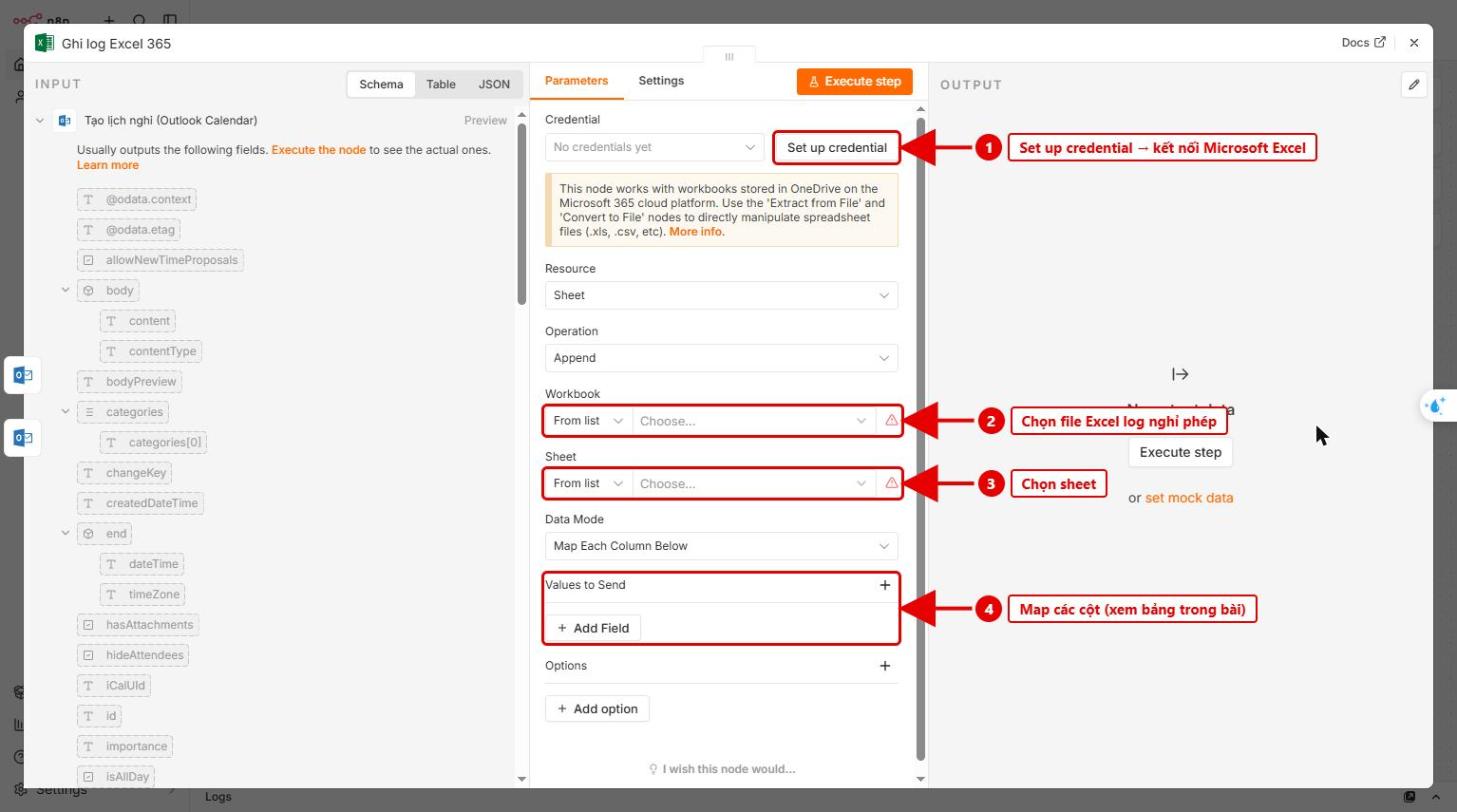
Hình 4: Node Ghi log Excel 365
6. Kích hoạt và gửi form cho nhân viên
- Bấm Publish – bắt buộc, vì nút Duyệt/Từ chối trong email chỉ hoạt động khi workflow đã kích hoạt.
- Mở node Form xin nghỉ phép → tab Production URL → sao chép link gửi cho nhân viên.
- Gửi thử một đơn với email quản lý là email của Quý Khách để kiểm tra.
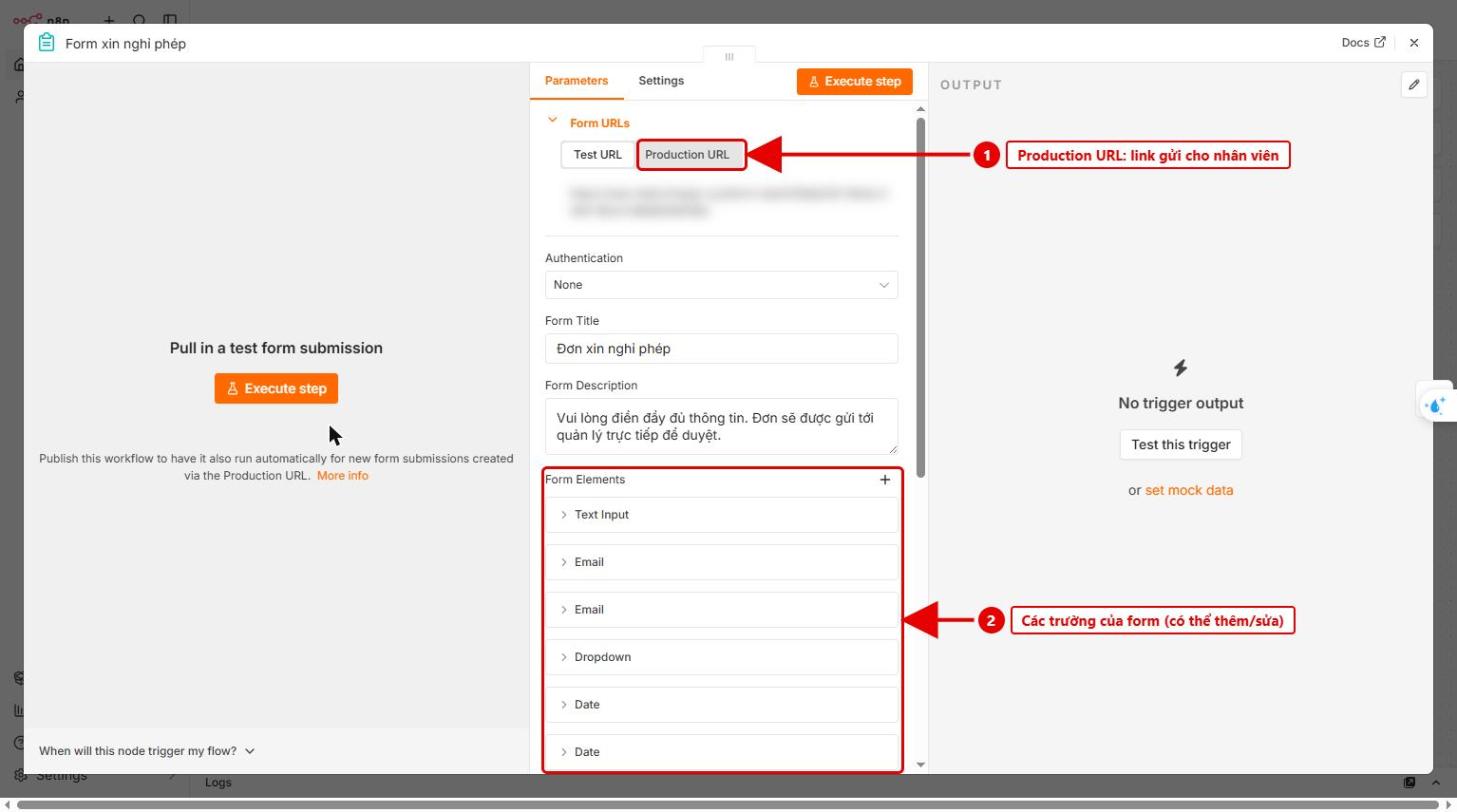
Hình 5: Lấy Production URL của form (đường dẫn đã che mờ)
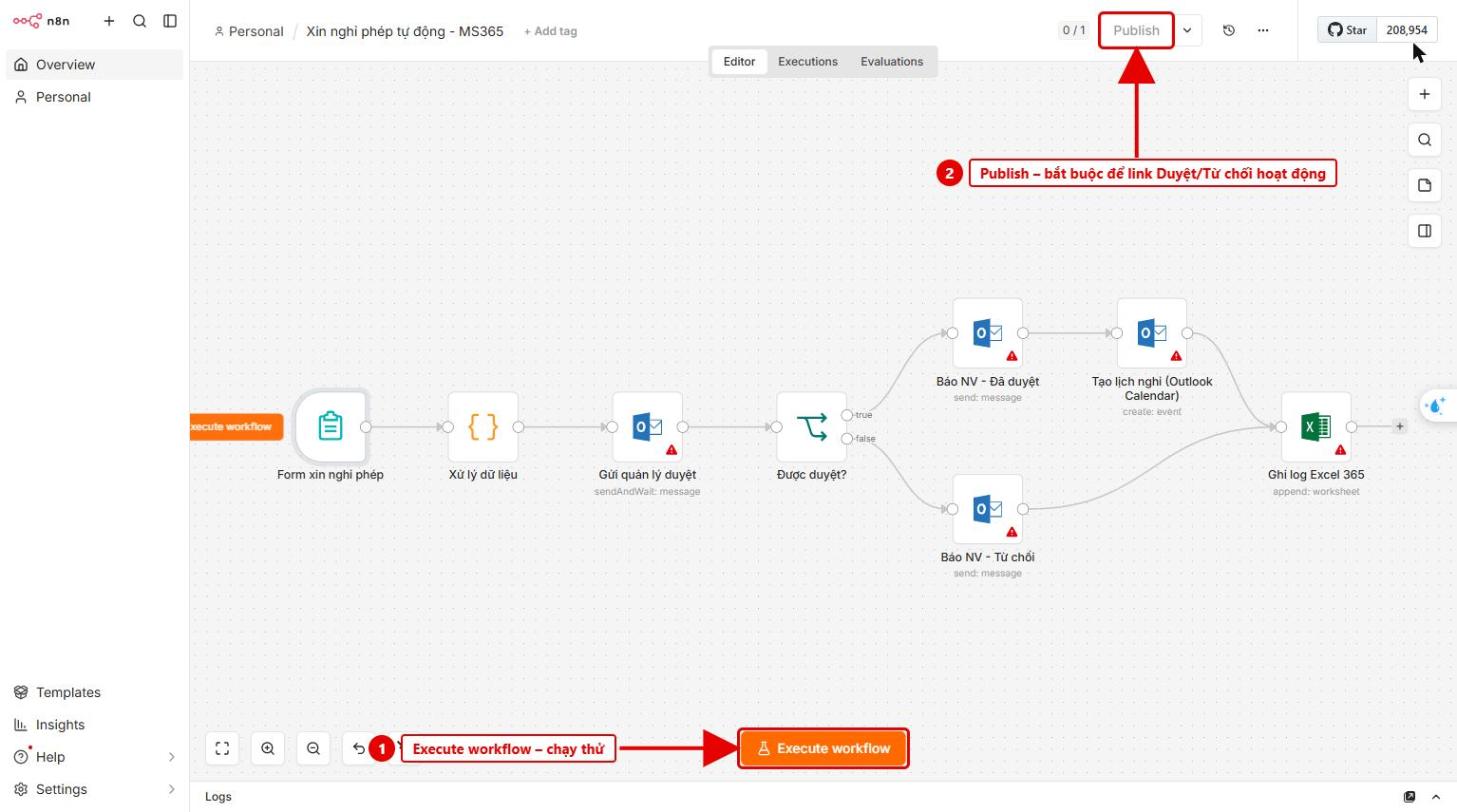
Hình 6: Execute workflow để chạy thử, Publish để kích hoạt
Mẹo: quản lý không phản hồi sau 3 ngày thì đơn được xem là từ chối – có thể đổi trong Options → Limit Wait Time của node Gửi quản lý duyệt.